The TRACKER program was originally written in 1974, to provide a convenient and practical way for amateur radio operators to track the moon. Since the original BASIC version, the program was re-written into FORTRAN IV, and then updated and revised a number of times in BASIC to include various features and enhancements. The program was compiled for speed and ease of use by all IBM-compatible computers - not just those with particular BASIC compilers.
In addition to providing "MOON" tracking information from any location on any date, it also shows estimates of the "db degradation" at that time (the increase in background noise compared to the most ideal situation, which would be when the moon is both closest to the earth and the sky behind it is most quiet). Perhaps the most valuable feature of TRACKER, is to be able to easily determine common window times between your location (shown at the bottom of the starting screen) and another station (the callsign you enter at the top of the screen). So, if you enter a callsign and hit ESC (instead of ENTER), it will seach for the locator, automatically enter it and calculate the coordinates for that station.
The program also can provide azimuth and elevation for "STARS" (the sun, or "fixed" points in the sky such as "cold sky" spots, the most popular celestial noise sources, or user defined objects). Complete features and operation guidelines are included with the program as part of the "HELP" key, F3:
1. General Program Features
2. MOON Tracking Specific Features/Options
3. STARS (Celestial Objects) Tracking Specific Features/Options
4. Use of Keyboard for Main Menus
5. Use of Keyboard During Program Screen Displays at Run Time
6. Information Regarding Derivation of Tracking Equations
7. Version Information/Setup Tips
Future program enhancements include the expansion of the SKYTEMP.DAT file to permit more accurate sky temperature estimates, and updating the code to Visual Basic, to permit easier operations in a Windows environment. TRACKER currently asks for and remembers your antenna beamwidth (which is required to determine more accurate sky noise values) but it currently does not perform calculations with this information.
TRACKER.ZIP Version7.0 (last revised May 5, 2003). Some of the features in this version include the option of a "REAL TIME" mode, as well as display of approximate sky temperature and "DB DEGREDATION" for selectable bands of 50,144, 432 and 1296 MHz. It also utilizes the file CALLSIGN.TXT, and supports "wild card" callsign searches. New stations and grids easily can be added to file CALLSIGN.TXT by pressing F6. Read the included file "README.TXT" for more information.
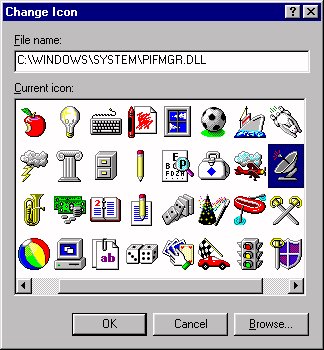
PIFMGR.DLL
This file provides an optional icon for use with your TRACKER desktop shortcut,
in the event you do not already have a version of windows with a suitable
icon file from which to select.
SPACE is a simple program that can be used to determine the approximate spatial clearance parameters of an array comprising any number of yagis, stacked vertically and/or horizontally. Front and Rear TURNING RADIUS as well as front and rear CLEARANCE HEIGHT, and minimum GROUND CLEARANCE are calculated as the array is elevated from 0 to 90 degrees. This old program is certainly far from high tech but has proven itself very handy in planning new towers and arrays, and in locating them properly in tight surroundings.
SPACE is also now available as an EXCEL program.
1. Make sure all the required files shown above are located in the same "directory" or "folder".
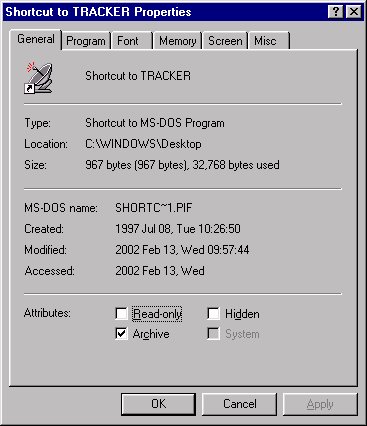
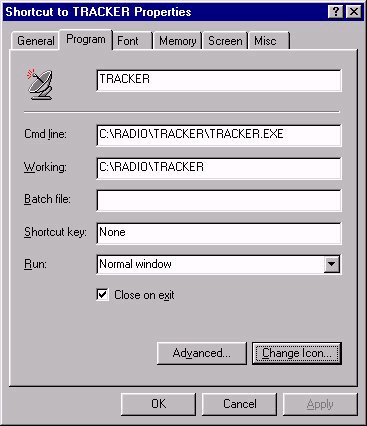
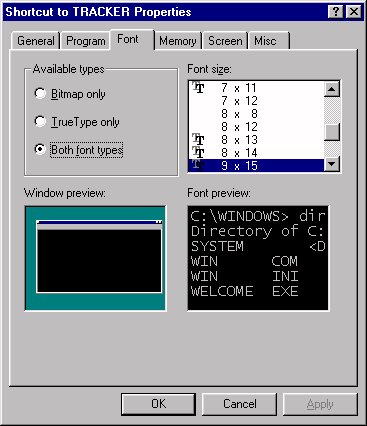
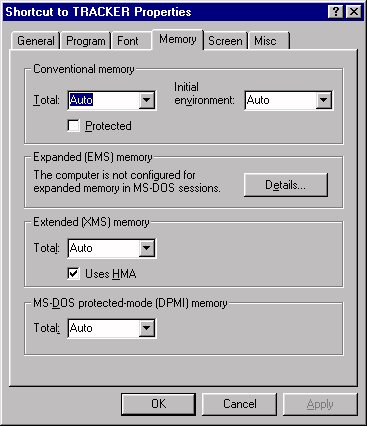
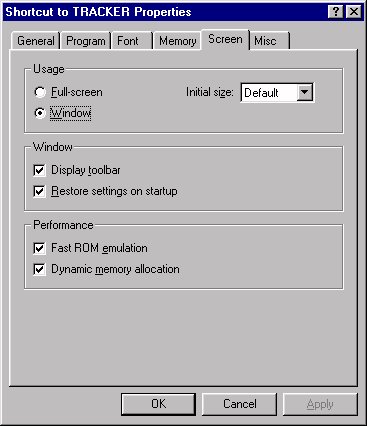
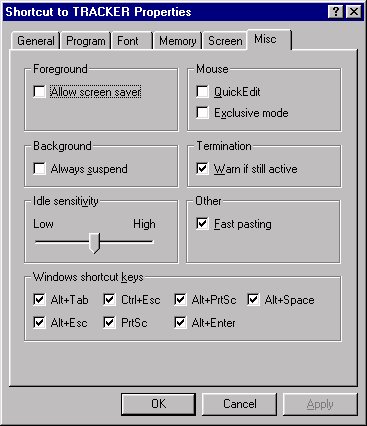
2. Make a "SHORTCUT" to the main application program (the one ending in .exe), and place it on the desktop. (For example, using the Windows Explorer, list the files in that folder. With your mouse, "right click" on TRACKER.EXE, and select the "Create Shortcut" option. Then drag the shortcut out of the folder and onto your desktop).
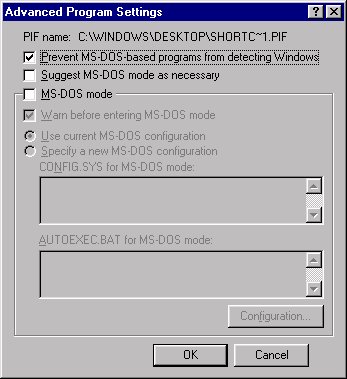
3. Then "right click" on the shortcut
and select "Properties". Below are the options I have selected, which
work very smoothly with my computers. Depending on your particular
configuration, you may have to experiment a bit with different options
until things work with your computer.
|
|
|
|
|
|
|
|
Click here to download the zipped file for CALLSIGN.TXT. CALLSIGN. TXT is used by the WSJT applications and the current version of TRACKER to automatically enter the other station's grid locator. Information on this file follows:
CALLSIGN.TXT
THIS VERSION WAS PREPARED
BY W7GJ ON MAY 5, 2003, FOR USE
WITH TRACKER AND WSJT PROGRAMS,
AND IS FREQUENTLY UPDATED.
IT COMBINES DATA FROM:
AA1YN'S VHF
AND UP REGISTRY
DL8EBW'S VHF
and MS/WSJT DATABASE
DL4EBY'S 432
AND UP EME DIRECTORY
W5LBT'S EME
DIRECTORY
CENTRAL
STATES VHF SOCIETY
RECORD FORMAT:
CALLSIGN (7), LOCATOR (6),
SPACE1(2), STATE (2), SPACE2 (2)
FIRST NAME (7), SPACE3 (2),
EMAIL (25)
In addition to being very useful for use with WSJT modes, it is used in TRACKER Version 7, and will also be used by the new Visual Basic version of my TRACKER moontracking program. It is in a text file format so you can correct/add/modify your personal version, using a text editor such as WORDPAD, or other types of database programs (PC File, EXCEL, etc.). Since this data base is a consolidation of information from other sources, no guarantee is offered regarding the accuracy of the information in this database.
You can also obtain program WsjtMerge200.zip from K2TXB, to combine various versions of CALLSIGN.TXT. Be sure to select the W7GJ format if you want to preserve all the data fields in the CALLSIGN.TXT file from this site.